PCB Fanout For High Pin-Count BGA Packages

High-pin count BGA packages can quickly consume routing real estate, especially when layer count is constrained. A 1300 pin BGA would typically drive a conservative stackup of 16 to 18 layers, but many designs are limited to 12 layers. In these situations, this is a case for Every Layer Inter-Connect (ELIC) technology, where every via is a micro-via. Of those 1300 pins, roughly 300 may be dedicated to ground and nearly that many again for voltage supplies. All that’s left is about 700 pins and 5% of those could be unused GPIO pins. Let’s begin with looking at the four quadrants that divide the fanout into more manageable bites - or is it bytes?

This article will discuss the following related to BGA fanout:

  • Line and space geometry
  • Placement requirements
  • When to break from normal standards

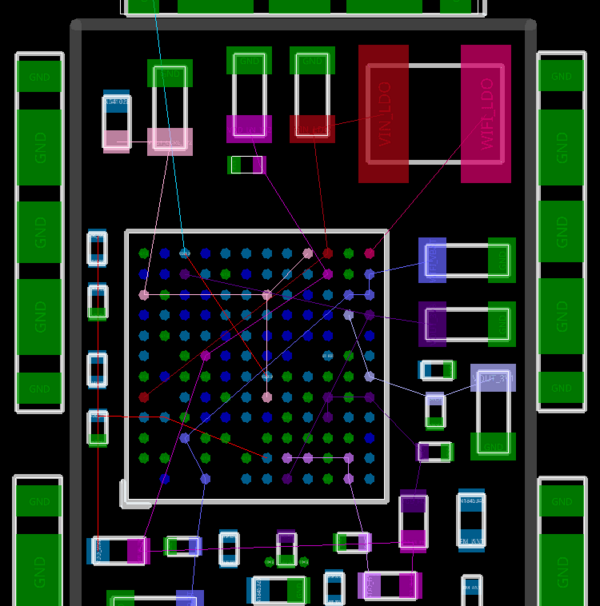
Figure 1. High pin-count devices require a lot more support in terms of bypass caps. Image Credit: Author 

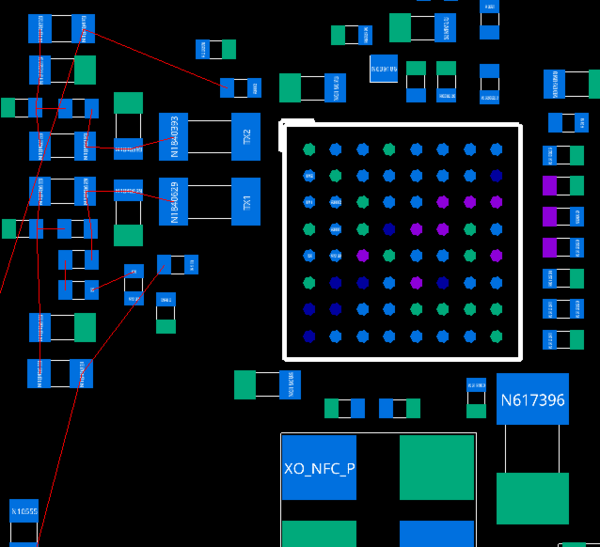
The point of this fanout study is to find the right mix of material and process that solves the puzzle. If we have the ball map, then a more thorough fanout study is possible by using the pin names that are associated with the pin numbers. A pin labeled RF_IN is going to be routed well before an anonymous pin is considered.

The power tree is another resource that is useful for an informed fanout study. The power is typically distributed through one or more Power Management Integrated Circuits that boils down to several co-packaged regulators. The PMIC family comes in many flavors that combine different voltage rails for specific applications.

Figure 2. Normal 5 mil lines are too wide for advantageous tape-out even when necking down to 4 mils. Image Credit: Author.

Just like memory, these PMIC devices would like to be near the processor. A shorter list would be ones that do not want to be near the SOC. Sensors and antennas fit this bill while digital circuitry has a way of finding the far reaches of the board as well. USB ports, SD cards and other I/Os are almost always edge mounted.

The initial question I want answered is how many rows can be accessed from the primary side of the board. That’s going to depend on the pin pitch and the trace/space dimensions. I began with the most conservative constraint set using 5-mil lines (127 micron) on the outer layers with 4-mil (100 micron) neck-down and air gap will only reach three rows into the grid. (see Figure 2)

Figure 3. The colors indicate how deep into the PCB we have to go to access pins using 4-mil trace/space with each pin fanned out individually. That’s not how it really works but does provide a benchmark for typical routing schemes. Image Credit: Author

Dropping down to 3-mil (76 micron) trace/space will allow routing into the 4th row/column. Ultimately, the third effort at the 68 micron node didn’t allow the traces to go any deeper. We will keep the minimum trace/space constraint to 75 microns where more fab vendors can participate.

The same geometry on an inner layer yields the same amount of penetration. Colorizing rings of BGA pins allows us to determine the number of layers it would take to fanout if every pin had a unique net. It doesn’t work this way in practice but it is a decent indicator of what we face with nets with a high pin-count alongside pins with special handling requirements. Figure 2 shows six color bands plus the 5 pins in the very center. This is based on a trace/space value of 76 microns for inner and outer layers.

Figure 4. We still get four rows deep on the outer layer but can access eight rows/columns using 40 micron trace geometry on inner layers. Image Credit: Author

It’s the inner layers where using HDI geometry pays off the most. The 76 micron geometry still took care of 4 rings of the BGA pattern on inner layers. That approach was going to require too many routing layers to reach the center. Figure 5 shows a fanout of eight columns/rows on a single layer. Two such layers with fine lines and space will be sufficient for fanout and routing of this device.

The stack-up will have those two layers devoted to routing signals where a thinner copper cross section will not be an issue. Using layers 3 and 9 will balance the copper loading for a symmetric stack-up to avoid warpage during processing. The dielectrics above and below those layers will also be the thinnest on the board. The other 10 layers will support power and ground along with traces that are more robust.

Figure 5. Layer 3 fanout using 40 micron HDI technology. Image Credit: Author

From there, the nature of the board will determine the mix of high-speed and/or high-frequency transmission lines. In all cases, the chip maker is going to want us to coddle many signals inside their own faraday cages. Timing budgets come on top of the impedance and isolation concerns.

In the beginning, it looks like it will take a miracle to escape the chip. Outer layer real estate around the edges of the device is precious. It’s helpful to use that layer to spread out before occupying other layers. What was put down to start with morphs to more nuanced form as the design evolves. The nice wide powerplane looks a bit lacy once all of the signals have escaped.

Why Twelve Layers Is The Sweet Spot 

The reason 12 layers works is that asking for more than that may be asking for trouble. I’ve gotten away with 14-layer ELIC boards but only in test quantities for the 12-layer boards. I believe that there are more factories comfortable with 12 layers than 14. Either way, a 3-N-3 stack-up is the sweet spot for getting through fabrication. Feel free to disagree on whether that is mainstream or extreme.

Figure 6. Roughly half of the pins are fanned out for this study. The rest would follow a similar pattern. I’d have to say that I was having fun with it, spending more time than necessary just to be working on the CAD station. Image Credit: Author

 When the design forces more layers, a buried core via or multiple spans of core via structures would be better in terms of board construction. These sub-stackups can be built in parallel then pressed into a thick PCB with a high layer count while having a relatively low number of lamination cycles.

Knowing the difference between feasible and economical is one of those distinctions we have to make. Your fab vendor’s CAM Engineer knows if and where the design is getting in its own way. Getting manufacturing information from boots on the ground is golden. Put those people on speed-dial and see if you can learn something from every tape-out.

Figure 7. The core of the device is a checkerboard of power and ground pins. The 0201 bypass caps are the perfect size for straddling those pins when placed diagonally. Image Credit: Author

Get In On The Ground Floor

While I would approach the fanout with the ground net first, only so many of the ground balls are going to make it all the way to the other side of the board. The SOC is going to support many power domains for all of the functions involved. All of those disparate power domains want a return path in close proximity. We want to make sure that the voltage circuit passes through the capacitor and ends at the voltage pin.

Let’s say you have four balls assigned to a power domain and we want a via for every pin to connect to a group of bypass capacitors on the secondary side of the board. Instead of the clean via-in-pad scheme, there will be four vias clustered within the group.

Figure 8. I may have started off with a via in every pad and nothing in between but the reality of feeding the power domains through the board to the field of caps required consolidation of the power pins. Image Credit: Author.

In practice, that means we’re not bound by the ball grid geometry to determine where to pack in the vias. If there is room for offset-vias as well as via-in-pad, we’re compelled to use both. Pushing things together will become a habit by the time everything is routed. Taking a break when you see spots is also a good idea.


About the Author

John Burkhert Jr is a Principle PCB Designer in retirement. For the past several years he has been sharing what he has learned for the sake of helping fresh and ambitious PCB Designers. The knowledge is passed along through stories and lessons learned from three decades of design including the most basic one-layer board up to the high reliability rigid-flex HDI designs for aerospace and military applications. John's well earned free time is spent on a bike or with a mic - doing a karaoke jam.

Profile Photo of John Burkhert