PCB Layer Stackup Design Strategies for EMI and Signal Integrity

The stackup is the first EMI decision you make and the hardest one to change. Once the layers are laminated, you’re stuck with them. Every trace you route, every via you drop, and every plane you pour inherits the constraints fixed within that stackup. If the stackup is wrong, no amount of routing fully recovers what you lost at the cross-section editor.

This post walks through the stackup decisions that matter most for EMI and signal integrity (SI), in the order they affect your design.

Decision 1: Every Signal Layer Gets an Adjacent Reference Plane

This is the single most important stackup rule. Every signal layer should reference at least one continuous adjacent plane, with no unrelated routing layer between the signal and its primary return path. Sierra Circuits puts it plainly: ideally all signal layers should be separated from each other by ground or continuous power planes.

The reason is return current. At high frequency, return current concentrates directly under the signal trace on the nearest reference plane. If there is no plane adjacent to the signal layer, the return current has to travel farther to find a reference, and the loop area grows. A bigger loop area means more inductance, more voltage ringing, and more radiated emissions.

Return current continuity matters just as much as plane adjacency. If the reference plane is interrupted by splits, voids, or large anti-pad clearances, the return current must detour around the discontinuity , increasing loop inductance and EMI. This becomes especially important during layer transitions, where stitching vias help maintain a short return path between reference planes.

A four-layer board with signal-plane-plane-signal works. A four-layer board with signal-signal-plane-plane does not. Same layer count, very different EMI behavior.


Figure 1. Allegro X PCB Layout Cross-Section Editor showing a stackup with signal layers properly sandwiched between reference planes. The NVIDIA Jetson AGX Orin board stackup

Decision 2: Stripline vs Microstrip Is a Field Containment Choice

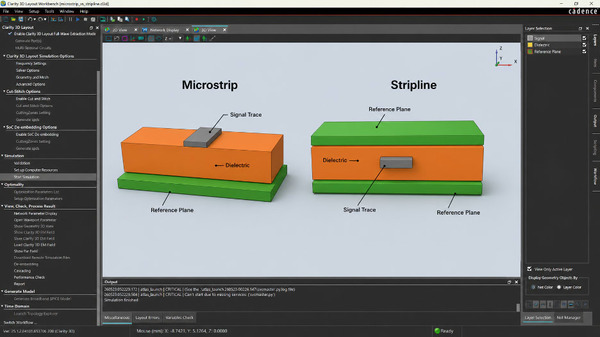
A stripline is any trace with a solid reference plane on both sides. A microstrip is a trace on an outer layer with a reference plane on one side and air on the other.


Figure 2. Microstrip vs Stripline stylized mockup visualization only within Cadence Clarity3D

Howard Johnson describes the difference in High-Speed Signal Propagation: a stripline contains the electric field completely between the two reference planes. A microstrip has its field partly in the dielectric and partly in the air above the trace. As a result, microstrip routing is generally more susceptible to radiation and external coupling than stripline routing.

For high-speed signals where EMI containment is critical, stripline routing is often preferred because it reduces external field coupling and radiated emissions. Thierauf notes that stripline construction needs at least six layers (two outer signals, four inner for the planes and stripline pairs). That layer count is real, and it costs real money, but it buys you field containment that microstrip cannot match.

The tradeoff is that stripline routing usually introduces higher dielectric loss than microstrip because the signal is fully embedded within the laminate. At very high data rates, designers often balance EMI containment, insertion loss, manufacturability, and via complexity when deciding whether a signal should route as stripline or microstrip.

Microstrip is fine for slower signals, short distances, and outer-layer routing that has to escape from a ball grid array (BGA) anyway. The decision is per-signal, not per-board. Critical high-speed nets go on stripline. The rest can use microstrip without compromising the design.

Decision 3: Plane Pairing Sets Your Power Distribution Network Behavior

Power and ground planes placed close together act as a parallel-plate capacitor. The closer they are, the more capacitance per unit area, and the better the power distribution network (PDN) behavior at high frequency.

A stackup that puts a ground plane directly adjacent to a power plane (separated by a thin dielectric) improves high-frequency PDN behavior by lowering plane impedance and supplementing discrete decoupling, especially where capacitor mounting inductance limits the effectiveness of discrete capacitors.


Figure 3. Allegro X PCB Layout Cross-section editor showing a PCB stackup for a 10-layer complex HDI PCB

A stackup that separates power and ground by a thick dielectric forces you to rely entirely on discrete capacitors, which works well at lower frequencies but becomes increasingly limited as capacitor mounting inductance begins to dominate PDN impedance.

For boards where switching noise drives EMI, plane pairing is one of the highest-return changes you can make. Two-mil dielectric between a power-ground pair gives you a meaningful PDN capacitance bonus that costs you almost nothing.

Decision 4: Dielectric Choice Sets Your Frequency Ceiling

FR-4 is the default. It is cheap, available, and works for most digital designs. Sierra Circuits notes that FR-4 is ideal for frequencies below the 2.5 to 3 GHz range. Above that, the dielectric constant starts shifting with frequency, which means different frequency components of your signal travel at different speeds. Signal dispersion and insertion loss both increase as frequency rises.

For boards that push above 3 GHz, you have options. Rogers materials (such as RO4350) hold their dielectric constant stable from DC to about 15 GHz. Megtron 6, Megtron 7, and similar low-loss laminates fall between FR-4 and Rogers in both cost and performance.

The choice affects EMI indirectly. A material with frequency-dependent dielectric constant produces signal distortion, which produces harmonic content, which produces emissions at frequencies you did not intend. Stable dielectric materials keep the spectral content of your signal closer to what you designed.

Decision 5: Symmetry Matters for Manufacturing and Performance

Sierra Circuits recommends balanced stackups with symmetrical layer arrangements. Symmetry in copper distribution, dielectric thickness, and laminate construction helps minimize board warpage during fabrication and reflow while maintaining more consistent electrical behavior between equivalent routing layers.

A good stackup is usually symmetrical around the center of the board, both mechanically and electrically. Symmetry in copper distribution, dielectric thickness, and laminate construction helps minimize board warpage during fabrication and reflow while maintaining more consistent electrical behavior between equivalent routing layers.

There are also other PCB stackup practices that improve high-speed performance and EMI behavior.

Adjacent routing layers that run long parallel traces in the same direction can strongly couple to one another. A common stackup strategy is to route neighboring signal layers orthogonally to reduce broadside crosstalk between layers , particularly in dense high-speed designs.

How to Set This Up in Allegro X PCB Layout

The Cross-Section Editor in Allegro X PCB Layout is where all of these decisions get captured. You define layer order, materials, copper weights, and dielectric properties in one place, and the tool uses that information to drive impedance calculation, via legality, and constraint enforcement. It can be found in the top menu under Setup.

Figure 4. Allegro X PCB Layout Cross-Section Editor with dielectric materials, copper weights, and impedance targets visible.

Once the stackup is right, you can import it for fabrication using IPC-2581 to keep the impedance and material data tied to the database your fabricator receives.

The stackup is decided once. The board stays with those materials and layers forever. Spend the time at the cross-section editor. It dictates everything. Students ask me all the time “how many layers do I use?” I tell them to create the necessary number of planes and routing layers to manage EMI, signal integrity, power integrity, and routing density simultaneousl. Give enough space for high-speed, power, and other critical signal traces as well. Once that’s achieved, then you have your answer. It’s not about how many layers you choose, it’s how you use them.

About the Author

Kirsch Mackey is an electrical engineer, educator, and content creator with over 15 years of experience spanning power systems, control systems, electrical systems, embedded programming, PCB design, power electronics, and high-speed digital systems. As founder of HaSofu and former adjunct professor, he developed the MESH method—a structured approach to high-speed PCB design that has helped students land roles at companies like Apple, Intel, Cisco, Garmin and Amazon in months rather than years. Drawing from industry experience at Intel and beyond, Kirsch bridges theory and practice through technical writing, courses, and hands-on workshops that make complex engineering concepts accessible and actionable.

Profile Photo of Kirsch Mackey