01 - OrCAD X Capture Overview
Overview
OrCAD® X Capture is a schematic design toolset for the Windows environment. With OrCAD X Capture or Capture, you can draft schematics and produce connectivity and simulation information for printed circuit boards and programmable logic designs. OrCAD X Capture is fully integrated with a number of tool suites, including PSpice and OrCAD X PCB layout.
With OrCAD X Capture, you can:
- Create schematics and produce connectivity and simulation information for printed circuit boards and programmable logic designs.
- Create designs for other EDA applications by choosing to set up a PSpice project at the start of creating a new project.
- Set user preferences for the appearance of all the designs on your system.
- Set up design options for each particular project or design you create.
- Use standard libraries to design schematics.
- Place parts in the OrCAD X Capture schematic editor.
- Create your own parts and part packages.
- Create your own library.
- Connect the parts with buses, wires, off-page connectors, and more.
OrCAD X Capture also includes verification and reporting, printing, and netlisting features for a schematic page, a folder, or an entire design.
Capture Custom Launch
You can relaunch OrCAD X Capture in a custom launch mode if Capture fails to launch for the first time. You can select different options to skip reading and initializing various settings and registry options in the next Capture launch for safety purpose.
You can skip any of the following options for the custom launch:
- Launching Capture with custom TCL scripts that are initialized at the start
- Launching Capture with encrypted TCL scripts that are initialized at the start
- Reading the user INI settings
- Reading the registry workspace settings
- Reading the Signal Integrity plugin
- Reading Testbench plugin
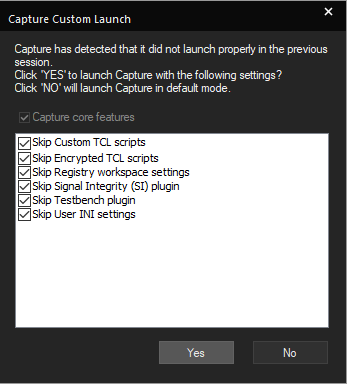
- Click Yes to enable custom launch. If you click No, Capture is launched with all the specified options.
The Capture Custom Launch window is displayed only after Capture fails at launching.
View the next document: 02 - OrCAD X Capture Interface
If you have any questions or comments about the OrCAD X platform, click on the link below.
Contact Us