Testing Printed Circuit Boards and Assemblies

A fabricator once told me that I would be astonished if I knew how much tweaking went on between receiving Gerber data and the start of fabrication. There are so-called global micro-edits that account for etch compensation, soldermask expansion, drill optimization and whatever else it takes to turn artwork into printed circuit boards. All of this intentional variability can affect how a PCB performs in the real world. Therefore, thorough  testing of PCBs and PCBAs is crucial to ensure compliance with the relevant standards.

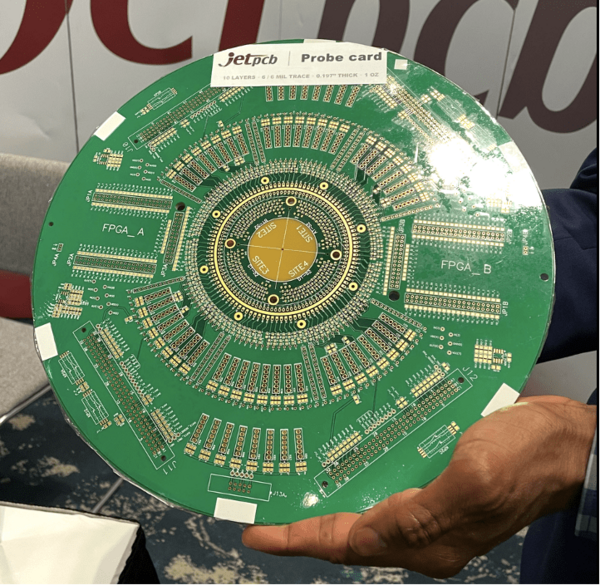
Figure 1. A test vehicle for unpackaged silicon is known as a probe card. The entire wafer is accessed for electrical verification prior to dicing and packaging the individual chips. Since the wafers are round, the board follows the geometry. Image Credit: Author.

Testing Individual Components

Making sure that electronic devices actually work can be very simple; so simple that I could learn to do it. A basic continuity test with a buzzer or light can confirm that the connection is there to begin with while a multi-meter can verify that the desired voltage is present. A test procedure is a document that will guide the technician through the steps involved. The procedure could include set-up diagrams and pass/fail criteria.

It’s so easy that a caveman like me can do it. The trouble only starts when the PCB doesn’t pass the test. Troubleshooting requires instinctual knowledge gained by hours and hours of working at the test bench. An Electrical Engineer or a veteran Technician will be able to suss out the problem in most cases.

Testing a chip usually requires a dedicated Device Under Test vehicle often called a “DUT card”. They normally have a socket to make it easy to install and remove devices. The socket adds its own parasitics so some test vehicles have a normal solder-down footprint for more precise measurements.

The Burn-In Room (or Chamber) for Stress Testing

Environmental testing may be facilitated by a larger PCB that holds many devices. The biggest PCBs I ever designed were for testing laptop batteries. It used 4 oz copper on the outer layers and 3 oz copper on the two inner layers. The board was loaded with batteries and put in a chamber that cycled between hot and cold while varying voltages from zero to 90% of the advertised limit for input power were applied. A load would be applied to discharge the batteries once they were fully charged and the cycle would repeat day and night for as long as necessary.

Completed products would be put on a rack and rolled into a larger burn-in room. They would sit in there for up to a week at a constant temperature. Thermal cycling is another means of aging a device. The goal is to expose any infant failures. There are two times when a product is most likely to fail. Those times are when the product was first put together and again the day after the warrantee expires. The failure rate is described by a bathtub curve; high rate of failure out of the gate and dropping down to a manageable level until the end of life creeps in with another spike in the failure rate.

Bare Board Testing

When we create a Fabrication Drawing, there are “NOTES: UNLESS OTHERWISE SPECIFIED.” One of those notes will be to tell the vendor to include a solder sample so that we know the board can withstand the rigors of assembly. We also require them to do an electrical test of all of the connections based on the netlist.

While the solder sample is obvious, it’s impossible to see if the connectivity had been verified at the fab shop. Of course, there will be an ink stamped marking on the board added after a successful test. We also require a Certificate of Compliance along with each lot that promises us that the required testing was completed to satisfaction. The C-of-C will be required for any other attributes that cannot be verified by visual means. Again, that’s where the fab notes come in though it may wind up as an instruction on the purchase order.

In Circuit Testing - ICT Fixtures

In order to speed things up, we add test points to the PCB. Ideally, 100% of the nets will have one or more test points. Power and Ground are obvious nodes where extra test points are necessary. Very low-value resistors may want two test points on either side of the component to get a more accurate reading. Otherwise, one TP per net is usually sufficient for 100% coverage.


Figure 2. In-Circuit-Test for an analog board can be tricky. In this case, the PCB is twice as thick as normal. That thickness allows us a larger distance to the reference planes so that the 50 ohm line calculation is equal to the diameter of the test point and the typical land patterns. We want the test point to be in line so they have to be considered during initial placement. This eliminates the impedance mismatch that a narrow trace or a stub would cause. Image Credit: Author

Test points should be spread out around the board rather than concentrated or lined up in neat rows. Each pogo pin exerts a bit of pressure on the board during the test. Too many in one area will tend to deflect the board so that some of the pins have marginal contact. The ICT points should also be kept clear of taller components.

The larger and more spread out the test points, the better in terms of the cost of the fixture. A custom ICT fixture is designed for each board. When editing a board, it’s important to leave all of the test points where they are if at all possible as these fixtures are expensive. Test point to test point spacing will be greater than test point to component spacing with the exception of the taller parts mentioned above.

One quick note about test points, if your design uses an Organic Solderability Preservative (OSP) finish, keep in mind that it is not durable for the long term. Protect the bare copper test points from oxidation by tinning each one. The easiest way to do that is to create a pad on the paste stencil layer - the same size as the test point. The test points will be given a coat of solder during reflow that will take a pogo pin just fine.

Flying Probe Test Fixtures

Similar to a pick and place machine, Flying Probe testing moves the probes around the board to take measurements one at a time. It can be programmed and reprogrammed as needed without buying a whole new fixture. It takes longer than using the ICT fixture but makes up for it in versatility. I can only imagine that AI can be put to use to locate all of the test points and figure out the best path for the probes to take to complete the test in the minimum time.

Figure 3. The other side of the analog board in Figure 2 has the DSP circuit. There is more leeway here but we’re still concerned about spacing rules. Using a component for the test point allows reference designators to identify the test points while ensuring complete coverage. Another benefit is using the DFA tool to create a component to component spacing rule for test points that spreads them out from one another while allowing closer proximity to the actual components. There would be a large value for the spacing from TP to TP and rest of the DFA spacing values would be derived from a typical resistor.

Boundary Scan Testing - JTAG

There are times when probing every net is a non-starter. In that case, we can still look into the workings of a PCBA through a dedicated connector. I’ve read that a JTAG has a minimum of four essential pins but I’ve never seen one with fewer than 8 pins. The essentials are TDI, TDO, TCK and TMS which stand for Data In, Data Out, Data CLK and Mode Select.

This technology is approximately as old as the first BGA package when probing all of the pins became impractical. A test access port (TAP) is built into most processors. The boundary can be used in a way that is similar to the buzz light tests for continuity. A bad solder joint or broken part might be revealed with this technology. You can debug software by stepping through the code instructions using modules built into the processors. The JTAG connector can also be used to write to flash certain memory devices.

I’ve implemented more of these types of connectors than I can count. The key thing is to give the JTAG connections the same level of attention as a typical bus. Decent isolation and solid, unbroken ground domains for routing are recommended. I have been asked to use length matching on the essential nets to increase the margin for set-up and hold times. More often than not, just routing the traces along the same general path will get the job done.

Functional Testing

Lastly there are printed circuit boards that are too compact for test access. An example would be a hearing aid. The board would be mounted in a custom fixture that provides power and then activates the circuit to see the result. 

Does the unit turn on and off? Does it make the right amount of sound throughout the range of expected volume settings? If it works, it works. If it doesn’t work, set it aside and test another one to see if it can be put in the enclosure during final assembly. If the output is a variable like this one, there may be a chance to bin the units according to their performance metrics. The best ones go into the flagship product and the marginal ones go into the bargain units.

About the Author

John Burkhert Jr is a Principle PCB Designer in retirement. For the past several years he has been sharing what he has learned for the sake of helping fresh and ambitious PCB Designers. The knowledge is passed along through stories and lessons learned from three decades of design including the most basic one-layer board up to the high reliability rigid-flex HDI designs for aerospace and military applications. John's well earned free time is spent on a bike or with a mic - doing a karaoke jam.

Profile Photo of John Burkhert